Skip to content
  • Categories
  • Recent
  • Tags
  • Popular
  • World
  • Users
  • Groups
Skins
  • Light
  • Brite
  • Cerulean
  • Cosmo
  • Flatly
  • Journal
  • Litera
  • Lumen
  • Lux
  • Materia
  • Minty
  • Morph
  • Pulse
  • Sandstone
  • Simplex
  • Sketchy
  • Spacelab
  • United
  • Yeti
  • Zephyr
  • Dark
  • Cyborg
  • Darkly
  • Quartz
  • Slate
  • Solar
  • Superhero
  • Vapor

  • Default (Darkly)
  • No Skin
Collapse
Brand Logo
  1. Home
  2. Uncategorized
  3. I couldn't get my Zebra printer to print well from the GUI because even with the exact right settings it failed...
I couldn't get my Zebra printer to print well from the GUI because even with the exact right settings it failed...

Scheduled Pinned Locked Moved Uncategorized
linuxtipskde
5 Posts 3 Posters 0 Views
  • Oldest to Newest
  • Newest to Oldest
  • Most Votes
Reply
  • Reply as topic
Log in to reply
This topic has been deleted. Only users with topic management privileges can see it.
  • AnthropyA This user is from outside of this forum
    AnthropyA This user is from outside of this forum
    Anthropy
    wrote last edited by
    #1

    I couldn't get my Zebra printer to print well from the GUI because even with the exact right settings it failed...

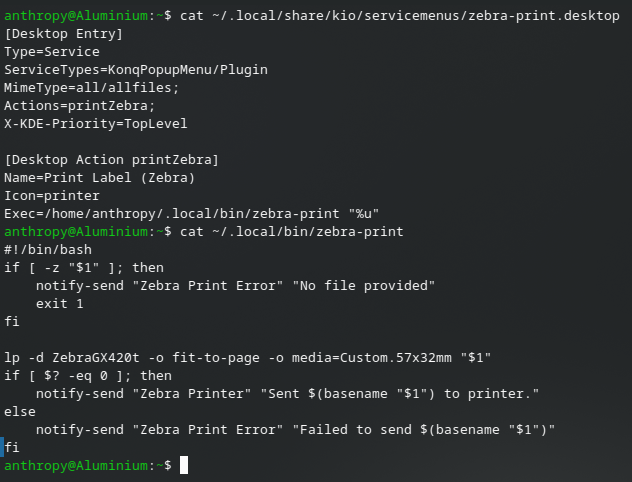
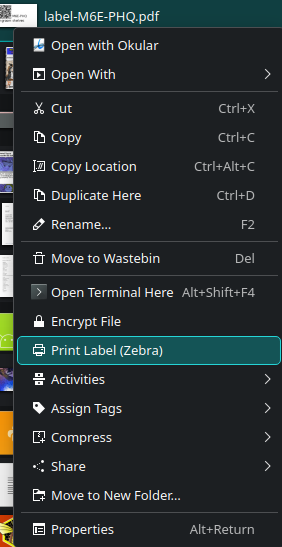
    ...so I created a script and hooked it into the KDE context menu. Figured I'd share it here to show others how easy it is to add things there:

    1) Create a script, put it in something like ~/.local/bin/zebra-print
    2) Create a desktop file in ~/.local/share/kio/servicemenus/zebra-print.desktop

    See file content in image below (since it doesn't fit in 500 characters)

    #LinuxTips #KDE

    RitchieA Natasha Nox πŸ‡ΊπŸ‡¦πŸ‡΅πŸ‡ΈN 2 Replies Last reply
    1
    0
    • R ActivityRelay shared this topic
    • AnthropyA Anthropy

      I couldn't get my Zebra printer to print well from the GUI because even with the exact right settings it failed...

      ...so I created a script and hooked it into the KDE context menu. Figured I'd share it here to show others how easy it is to add things there:

      1) Create a script, put it in something like ~/.local/bin/zebra-print
      2) Create a desktop file in ~/.local/share/kio/servicemenus/zebra-print.desktop

      See file content in image below (since it doesn't fit in 500 characters)

      #LinuxTips #KDE

      RitchieA This user is from outside of this forum
      RitchieA This user is from outside of this forum
      Ritchie
      wrote last edited by
      #2

      @anthropy I just have one question?

      How good is it at printing zebras?

      AnthropyA 1 Reply Last reply
      0
      • RitchieA Ritchie

        @anthropy I just have one question?

        How good is it at printing zebras?

        AnthropyA This user is from outside of this forum
        AnthropyA This user is from outside of this forum
        Anthropy
        wrote last edited by
        #3

        @acidiclight it does the stripes rather well if you print barcodes (which is why the company is called Zebra!)

        1 Reply Last reply
        1
        0
        • AnthropyA Anthropy

          I couldn't get my Zebra printer to print well from the GUI because even with the exact right settings it failed...

          ...so I created a script and hooked it into the KDE context menu. Figured I'd share it here to show others how easy it is to add things there:

          1) Create a script, put it in something like ~/.local/bin/zebra-print
          2) Create a desktop file in ~/.local/share/kio/servicemenus/zebra-print.desktop

          See file content in image below (since it doesn't fit in 500 characters)

          #LinuxTips #KDE

          Natasha Nox πŸ‡ΊπŸ‡¦πŸ‡΅πŸ‡ΈN This user is from outside of this forum
          Natasha Nox πŸ‡ΊπŸ‡¦πŸ‡΅πŸ‡ΈN This user is from outside of this forum
          Natasha Nox πŸ‡ΊπŸ‡¦πŸ‡΅πŸ‡Έ
          wrote last edited by
          #4

          @anthropy Can you also put them into subdirectories within the context menu this way? πŸ€”

          AnthropyA 1 Reply Last reply
          0
          • Natasha Nox πŸ‡ΊπŸ‡¦πŸ‡΅πŸ‡ΈN Natasha Nox πŸ‡ΊπŸ‡¦πŸ‡΅πŸ‡Έ

            @anthropy Can you also put them into subdirectories within the context menu this way? πŸ€”

            AnthropyA This user is from outside of this forum
            AnthropyA This user is from outside of this forum
            Anthropy
            wrote last edited by
            #5

            @Natanox Yes, all you have to do for that is to add an entry like this:

            [Desktop Entry] <-- under this section
            X-KDE-Submenu=Name of Menu

            1 Reply Last reply
            1
            0
            Reply
            • Reply as topic
            Log in to reply
            • Oldest to Newest
            • Newest to Oldest
            • Most Votes


            • Login

            • Don't have an account? Register

            • Login or register to search.
            Powered by NodeBB Contributors
            • First post
              Last post
            0
            • Categories
            • Recent
            • Tags
            • Popular
            • World
            • Users
            • Groups