So I upgraded to iOS 26 last night.
-
@bitterseeds Maybe! But do you use light mode or dark mode?
@jeridansky dark mode for the system. I tried every icon combo and none made label text black. I just switched to light mode for system wide and the text stayed white. Not sure what’s causing this for you.
-
@jeridansky dark mode for the system. I tried every icon combo and none made label text black. I just switched to light mode for system wide and the text stayed white. Not sure what’s causing this for you.
@bitterseeds Thanks for testing it for me! I thought light mode might be the culprit, but I guess not.
-
@bitterseeds Thanks for testing it for me! I thought light mode might be the culprit, but I guess not.
@bitterseeds And I just tried a photo wallpaper, and now my labels are white. Which is fine except I don't want the photo wallpaper. So I took a photo of something that was a solid color, used that as my wallpaper, and kept the white labels.
-
So I upgraded to iOS 26 last night. Changed the clock display on the lock screen. Turned off auto updates to iOS. Apple Intelligence doesn’t run on my iPhone SE, so nothing to turn off there.
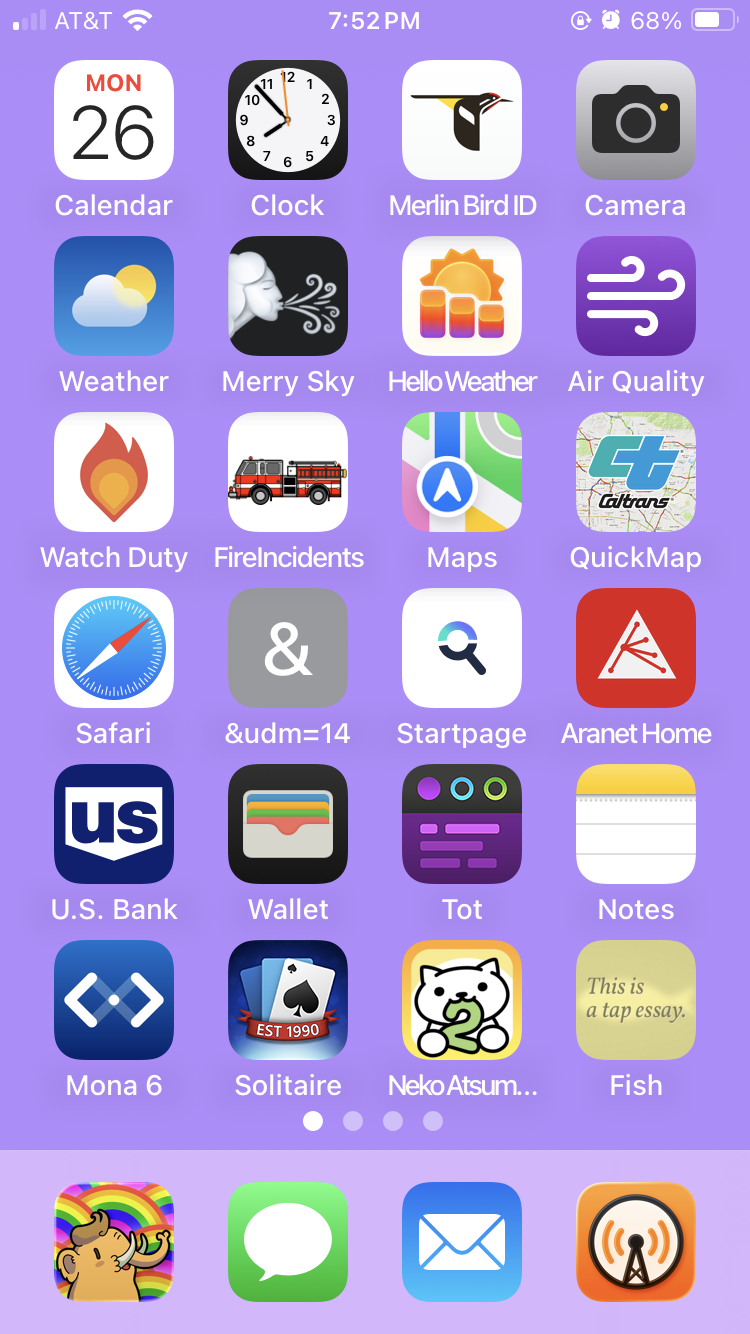
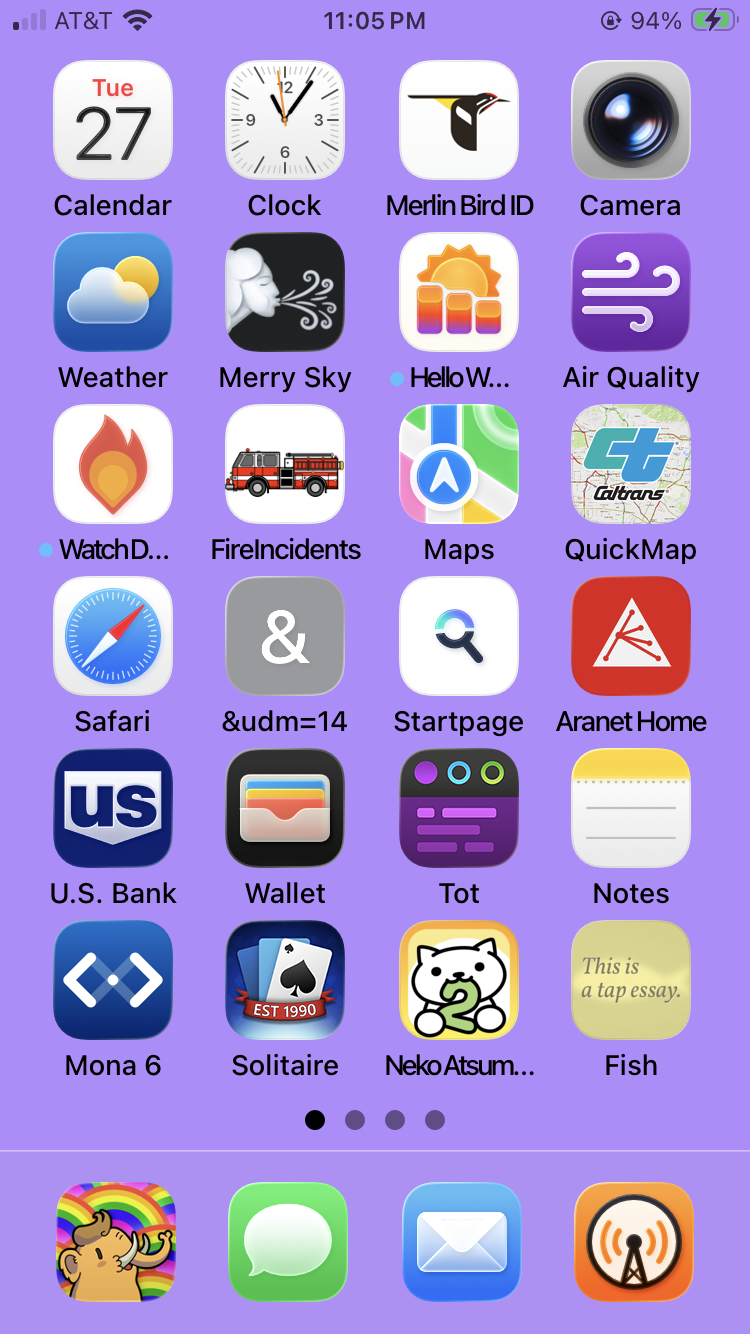
And so far my main gripe is that it’s so darn ugly. Prior home screen on the left, new one on the right. Yucky new icons for the clock and camera. And I can’t figure out how to get my icon labels to be white rather than black. I see screenshots from others with white labels!
And a variety of little annoyances. But overall, not as bad as I feared.
Thanks to @bitterseeds I found out how to get my white icon labels. It isn't a matter of light mode vs. dark mode. I just had to use a photo as my wallpaper rather than a color.
But I don't want the busyness that I get with most photo wallpapers, so I just took a photo of something that's a solid color and I kept my white labels.
-
Thanks to @bitterseeds I found out how to get my white icon labels. It isn't a matter of light mode vs. dark mode. I just had to use a photo as my wallpaper rather than a color.
But I don't want the busyness that I get with most photo wallpapers, so I just took a photo of something that's a solid color and I kept my white labels.
@jeridansky well, that's genius, Jeri. When I finally have to update I'll remember this! thank you.
-
So I upgraded to iOS 26 last night. Changed the clock display on the lock screen. Turned off auto updates to iOS. Apple Intelligence doesn’t run on my iPhone SE, so nothing to turn off there.
And so far my main gripe is that it’s so darn ugly. Prior home screen on the left, new one on the right. Yucky new icons for the clock and camera. And I can’t figure out how to get my icon labels to be white rather than black. I see screenshots from others with white labels!
And a variety of little annoyances. But overall, not as bad as I feared.
@jeridansky If you want to go one step further you can create shortcuts to replace the icons with your own choice of images.
Once did that I found it less stressful when Apple makes changes because my icons remain the images I chose. -
@jeridansky well, that's genius, Jeri. When I finally have to update I'll remember this! thank you.
@CaraBruar You're very welcome. I finally updated to iOS 26 because I couldn't get the security updates until I did, and it sounded like there might be a serious security issue.
-
@jeridansky If you want to go one step further you can create shortcuts to replace the icons with your own choice of images.
Once did that I found it less stressful when Apple makes changes because my icons remain the images I chose.@stephaniepixie Something to consider — thank you!
-
Thanks to @bitterseeds I found out how to get my white icon labels. It isn't a matter of light mode vs. dark mode. I just had to use a photo as my wallpaper rather than a color.
But I don't want the busyness that I get with most photo wallpapers, so I just took a photo of something that's a solid color and I kept my white labels.
@jeridansky I suspect it may actually be a matter of contrast, not whether it is a solid colour or a photo. Have you tried using a slightly darker purple, for example?

-
@jeridansky I suspect it may actually be a matter of contrast, not whether it is a solid colour or a photo. Have you tried using a slightly darker purple, for example?
@sindarina Yeah, I tried a darker purple, since that seemed like the obvious answer. Still had black icon labels, now with shitty contrast.
-
@CaraBruar You're very welcome. I finally updated to iOS 26 because I couldn't get the security updates until I did, and it sounded like there might be a serious security issue.
@jeridansky I put it off as long as possible to increase the chances of my glucose monitor still working. The manufacturers are often slow to test against updates.
-
@sindarina Yeah, I tried a darker purple, since that seemed like the obvious answer. Still had black icon labels, now with shitty contrast.
@jeridansky Huh, weird.
Oh, just remembered; I have a grey background, but a slight gradient from top to bottom instead of just a solid colour.
But hey, if a photo also works for what you're trying to achieve


 ️
️ -
@jeridansky Huh, weird.
Oh, just remembered; I have a grey background, but a slight gradient from top to bottom instead of just a solid colour.
But hey, if a photo also works for what you're trying to achieve
️@sindarina Oh, I didn't test a gradient. That might be a good option, too. Except when I just now tried it with an orange I got black icon labels again.
-
@jeridansky I put it off as long as possible to increase the chances of my glucose monitor still working. The manufacturers are often slow to test against updates.
@CaraBruar Good reason for holding off!